


FEATURE SET
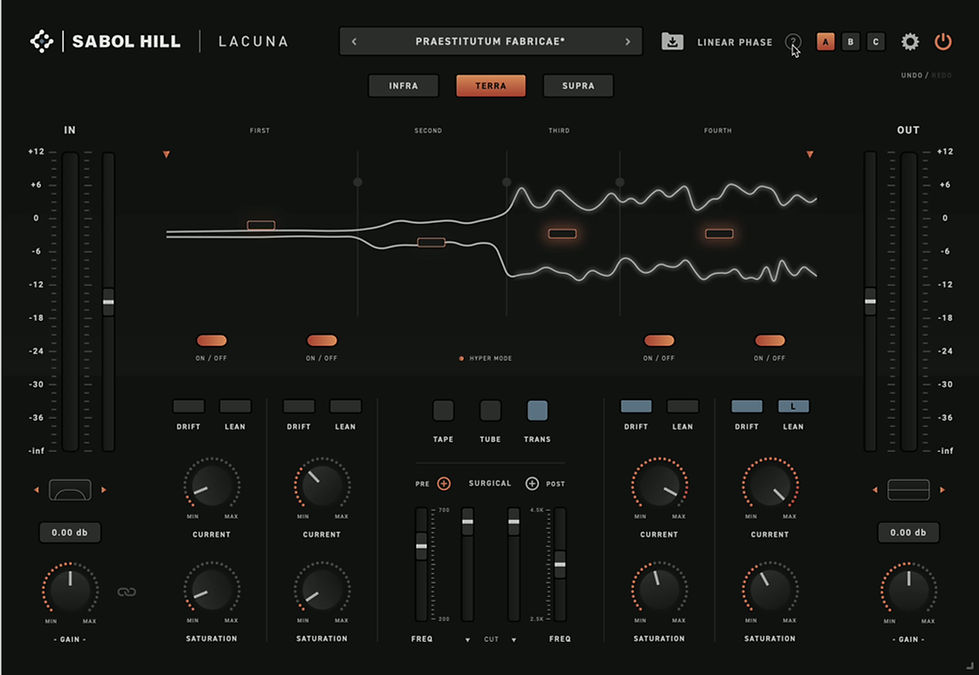
CURRENT is our proprietary technology - a dual-mono stochastic spectral drift. Translation: a constant evolution that’s different on Left versus Right, imparting movement, width and depth that brings your source to life in a way never before heard in the digital realm. It never nulls with itself, but also doesn’t noticeably change the character of your source - it just gives it its own space in your mix. CURRENT is controllable per-band.


TAPE, TUBE and TRANS are our physics-based saturation technologies, with independent saturation depth available across all four bands. Sculpt the harmonic identity of each region while preserving a unified analog character across the full signal.
INFRA, TERRA, and SUPRA are three distinct box tone colors applied under the hood. Choose between INFRA’s dark warmth, TERRA’s balanced hype, or SUPRA’s airy presence - or deactivate them entirely by clicking.

DRIFT is a dual-mono offset of each band’s center frequency, pulling it apart for added width and dimension that stays mono-compatible.
LEAN toggles between L and R (or off), allowing you to make each band favor the Left or Right channel for enhanced stereo interest without sounding panned.

Volume sliders in the animation window enable you to use LACUNA like a 4 band EQ, shaping the overall curve of your source with moveable cutoff points for each band.


HYPER MODE doubles the drive of the saturation circuit globally under the hood.

SURGICAL filters are for attenuating problem areas in the “boxy” and “harsh” regions of your source - PRE or POST to place them before or after the saturation circuit.
FIRST, SECOND, THIRD, and FOURTH are the buttons for you to solo any band you wish.


High Pass and Low Pass filters placed both before and after Lacuna’s entire circuit, because we know you might want to shape your source going in and coming out.

Input and output gain with a gain link feature so you can hit Lacuna’s saturation circuit harder by turning up the input gain while the output gain compensates automatically - perfect for adding harmonic intensity without suffering from the louder-is-better bias.
A, B, and C buttons will save Lacuna in different temporary states so you can compare settings.


Resizable UI - Scale Lacuna’s interface freely using the corner resize handle.
“?” button can be activated for hover tooltips, so you can see a short description of each parameter by hovering over it with your cursor.
SYSTEM REQUIREMENTS
MacOS 10.13 or higher
Windows 10 or higher